
6 Best Standing Desk Accessories for Small Spaces
For shoppers comparing the best standing desk accessories, the Ergodriven Topo Standing Desk Mat is the top pick for most buyers. Its contoured surface gives your feet several places to shift, making long standing sessions less static than a flat mat.
This guide is for anyone building a more comfortable sit-stand workstation at home or work. When choosing accessories, focus on the mat’s size, surface material, and available floor space. A larger mat gives you more room to move, while a durable, cushioned surface can support longer standing periods. The six picks below are ranked by their strongest use case, with clear reasons and honest drawbacks for each. You will find options for small desks, shared workspaces, active standers, and buyers who want simple support without spending too much. Each product fits a different desk setup and daily routine.
Quick Comparison
| # | Product | Best For | Price | |
|---|---|---|---|---|
| 1 | Ergodriven Topo Standing Desk Mat | Standing desk pressure relief | $109.00 | View → |
| 2 | Yes4All Wobble Balance Board | Balance practice between work tasks | $51.51 | View → |
| 3 | Ergodriven Topo Mini Standing Desk Mat | Compact standing desk setups | $79.00 | View → |
| 4 | Ergohead Anti-Fatigue Kitchen Floor Mat | Cooks needing cushioned floor support | $24.99 | View → |
| 5 | Jgstkcity Desk Clamp Power Strip | Desks needing clamp-on outlets | $32.99 | View → |
| 6 | Mzmaxy Under-Desk Cable Management Tray | Hiding cables beneath desks | $23.99 | View → |
6 best standing desk accessories, ranked
The list is ranked by adjustability, comfort, and value, counting down to the top pick.
6. Mzmaxy Under-Desk Cable Management Tray

Best for: Clamp-on cable storage for standing desks
The Mzmaxy Cable Management tray is a 25-inch metal mesh basket that mounts beneath a desk without drilling. Its adjustable clamps fit desktops from 0.4 to 2 inches thick and support about 15 pounds. Rubber pads on the clamps help protect the desk surface. The tray arrives in two sections, so you must join them with screws, but the listed assembly time is three minutes or less.
Its open mesh design gives power strips and adapters airflow instead of trapping them in a solid box. Open sides also let charging cables pass through without threading them around the tray. You can install the basket facing inward or outward, which helps when desk legs or other accessories limit space. At $23.99, it offers a practical way to lift cords and sockets off the floor. Still, the clamp system limits compatibility, and the 15-pound capacity may not suit large power supplies or heavy cable bundles.
Pros
- No-drill installation: Adjustable clamps attach to desks between 0.4 and 2 inches thick.
- Useful capacity: The 25-inch tray supports approximately 15 pounds of cables, adapters, and power strips.
- Flexible access: Inward or outward mounting and open sides make cables easier to route.
Cons
- Requires screw assembly: The tray comes in two pieces and needs joining before installation.
- Desk and weight limits: It will not fit surfaces outside the stated thickness range, and 15 pounds may be insufficient for heavier equipment.
5. Jgstkcity Desk Clamp Power Strip

Best for: Cable-heavy home office desks
This Jgstkcity desk clamp power strip combines five AC outlets with six USB ports in a compact desktop station. Four USB-C ports support up to 20W PD each, while two USB-A ports provide up to 3A per port. The USB section has a 40W total output, so all ports cannot deliver their maximum rates at the same time. A 6-foot flat plug cord gives it useful reach behind a desk.
The clamp fits tabletops up to 1.96 inches thick and mounts on the back or side edge. It needs about 0.4 to 0.5 inches of space from the wall, which may rule out some tight desk setups. The unit uses fireproof plastic and carries an ETL listing, plus a 1,200-joule surge rating. At $32.99, it offers plenty of charging access without taking up a power outlet on the floor. Its widely spaced AC outlets should fit larger adapters better than a compact travel strip.
Pros
- Four USB-C ports provide up to 20W PD charging each, useful for phones, tablets, and smaller devices.
- The clamp keeps five AC outlets and six USB ports within reach, reducing loose cables across the desktop.
- A 1,200-joule surge rating, overload protection, and ETL listing add useful safety coverage.
Cons
- The USB ports share 40W, so connecting several devices can reduce charging speed.
- The clamp requires a desk edge no thicker than 1.96 inches and 0.4 to 0.5 inches of wall clearance.
4. Ergohead Anti-Fatigue Kitchen Floor Mat

Best for: Small standing workstations and sinks
The Ergohead Anti Fatigue Kitchen Floor Mat is a compact standing mat measuring 17 by 22 inches. At $24.99, it offers cushioning for hard floors in kitchens, offices, laundry rooms, workshops, and other standing areas. Its built-in handle makes the mat easy to move between rooms or hang on a hook when it is not in use.
Raised massage points add texture underfoot and may encourage small foot movements during extended standing. The cushioned surface can reduce pressure from tile, concrete, or other firm flooring, while the non-slip bottom helps keep the mat in place. Its black finish fits most work areas, and the portable design works well beside a sink, cashier station, craft table, or standing desk. The 17-by-22-inch footprint is useful where space is limited, but it gives less room to shift position than a full-size kitchen mat. The product listing does not provide a material type or cushioning thickness, so buyers cannot easily compare its construction with larger anti-fatigue mats.
Pros
- Built-in handle makes carrying and hanging simple.
- Massage points provide added texture for foot movement.
- Non-slip bottom helps limit unwanted sliding on the floor.
Cons
- The 17-by-22-inch size may feel cramped for two-foot standing positions.
- Massage points and cushioning may not suit people who prefer a smooth, firm mat.
3. Ergodriven Topo Mini Standing Desk Mat

Best for: Compact standing desk workstations
Topo Mini is a non-flat standing desk mat made from thick, supportive foam. Its raised, uneven surface gives your feet several positions instead of forcing you to stand on one flat plane. The center indentation also lets you pull the mat closer or push it back with one foot. That makes it easier to switch between sitting and standing without bending down.
The Obsidian Black mat costs $79 and contains no PFAS or PVC, according to the listed specifications. Ergodriven says more than 500,000 units have sold and includes a seven-year manufacturer’s warranty plus a full-refund satisfaction guarantee. Those policies reduce the risk of paying a premium for a mat that does not suit your setup. The main difference from a basic kitchen mat is the calculated terrain, which encourages small foot and ankle movements while you work. However, the Mini format may not provide enough room for users who shift their stance often or share space with a large chair.
Pros
- Raised terrain offers multiple foot positions during standing work.
- One-foot repositioning makes transitions between sitting and standing easier.
- Seven-year warranty and full-refund guarantee provide strong purchase protection.
Cons
- The $79 price is high compared with simple flat anti-fatigue mats.
- The Mini design offers less standing area than a full-size mat.
2. Yes4All Wobble Balance Board
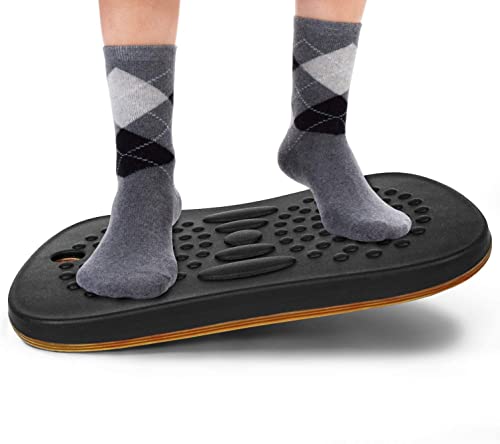
Best for: Standing desk users needing cushioned balance
The Yes4All Wobble Balance Board uses closed-cell EVA foam as a soft platform for standing, balance work, and light exercise. It comes in two sizes: 19 by 15 by 2.25 inches or 15.5 by 13.5 by 2 inches. The larger pad gives your feet more room, while the smaller version takes up less space under a desk. Its textured surface adds grip and resists sweat, which can help reduce sliding during workouts.
This pad also works for lunges, squats, push-ups, sit-ups, yoga poses, and rehabilitation exercises. The foam construction should feel gentler on joints than a hard balance board, making it suitable for seniors and physical therapy routines. However, it provides a different challenge than a rigid rocker, so users wanting intense instability may find it too forgiving. The listing also gives conflicting support terms, stating both a 1-year and 5-year warranty, along with 30-day and 60-day return periods.
Pros
- Closed-cell EVA foam provides a cushioned surface for standing and exercise.
- Two sizes suit compact desks or users who want more foot space.
- Textured, sweat-resistant surface helps improve grip during workouts.
Cons
- Only two fixed sizes are available, with no adjustable height or balance level.
- Warranty and return details conflict, so confirm the current terms before buying.
1. Ergodriven Topo Standing Desk Mat

Best for: Standing desk users who move often
The Topo by Ergodriven is a non-flat anti-fatigue mat designed for standing desks. Its thick comfort foam supports your feet while raised sections and a center indentation give you places to shift, stretch, and change position. The Obsidian Black version uses PVC-free materials and costs $109. It is built for workstations where a flat kitchen mat feels too limited.
Topo’s main advantage is its shape. You can hook a heel or toe into the indentation and pull it from beneath your desk without bending down. The textured terrain also gives your feet more movement options than a standard rectangle. Ergodriven says more than 500,000 units have sold, and the mat includes a seven-year manufacturer’s warranty plus a full-refund satisfaction guarantee. Those policies reduce the risk of trying a premium-priced accessory, though the $109 cost remains high for a floor mat.
Pros
- Raised terrain encourages small foot and ankle movements during standing work.
- The center indentation lets you reposition the mat with one foot.
- PVC-free foam construction provides cushioning without a flat, hard surface.
Cons
- At $109, it costs much more than many basic anti-fatigue mats.
- The sculpted terrain may feel awkward for users who prefer a flat, open standing surface.
Buying Guide
The most important factor is fit with your desk height and reach, because an accessory that forces bent wrists or raised shoulders can cause discomfort within a workday. Measure before buying, especially if you switch between sitting and standing.
- Ergonomic adjustment: Choose a monitor arm with at least 10 inches of vertical travel and a keyboard tray that tilts around 15 degrees. Your elbows should stay near 90 degrees.
- Desk compatibility: Confirm the clamp thickness range, often 0.4 to 2.4 inches, and leave 3 inches behind the desk for the clamp. Grommet mounts need a drilled hole.
- Weight capacity: Add the weight of every device. A laptop stand rated for 11 pounds fits most laptops, while a monitor arm should support your display’s listed weight without its base.
- Cable management: Look for sleeves at least 36 inches long, reusable ties in packs of 10 or more, and cable trays wider than 3 inches. Keep power cords off the floor.
- Price and warranty: Budget $20 to $45 for a footrest, $30 to $80 for a monitor arm, and $15 to $35 for cable tools. Prefer at least a one-year warranty.
If you cannot buy everything, prioritize ergonomic adjustment and correct desk compatibility, since poor fit affects every minute at the workstation.
Frequently Asked Questions
What are the best standing desk accessories for comfort?
The best standing desk accessories for comfort are an anti-fatigue mat, monitor arm, keyboard tray, and footrest. A mat with at least 3/4-inch foam can reduce pressure during longer standing sessions. Choose a monitor arm that places the screen about an arm’s length away.
How high should a standing desk monitor be?
A standing desk monitor should sit with its top edge at or slightly below eye level. Keep the screen roughly 20 to 30 inches from your face, and tilt it upward only if needed. A monitor arm makes height changes easier when you alternate between sitting and standing.
Can a standing desk mat reduce foot and leg fatigue?
Yes, a standing desk mat can reduce foot and leg fatigue by cushioning hard floors and supporting small shifts in posture. Choose one at least 3/4 inch thick, with beveled edges that lower trip risk. A width of 20 to 24 inches gives each foot room to move.
Do I need a keyboard tray for a standing desk?
No, you do not need a keyboard tray if your desk keeps your keyboard and mouse at elbow height. A tray can help when the desktop is too high, with a drop of 2 to 4 inches often improving wrist position. Look for a tray at least 25 inches wide.
Conclusion
The Ergodriven Topo Standing Desk Mat is the top recommendation for people who alternate between sitting and standing, especially those who want active foot support during long work sessions. If your priority is a cleaner, more compact setup, pick a low-profile flat mat instead, because it slides under the desk more easily, leaves more floor space, and creates fewer obstacles for a rolling chair. Before buying, double-check the mat’s size against your floor area, confirm compatibility with your desk base and chair movement, verify the package quantity, and compare the current price from trusted retailers to avoid a poor fit or overpriced bundle before placing the order at checkout.