
7 Best Golf Ball Printer Picks for Custom Gifts
For shoppers seeking the best golf ball printer, the H5 Smart Golf Ball Printer is the top pick for most buyers. Its main advantage is a focused design for printing custom logos, names, and graphics directly onto golf balls, rather than adapting a general printer. That makes it a practical choice for golf shops, event planners, coaches, and small businesses that need personalized balls.
This guide is for anyone comparing equipment for golf-ball branding, gifts, tournaments, or resale products. The most important factors are the printer’s physical size, printable coverage, compatible ball materials, ink system, and production capacity. These details affect setup space, image quality, operating costs, and how many balls you can print in one session. The 7 picks below are ranked with clear reasons and honest drawbacks for each.
Quick Comparison
| # | Product | Best For | Price | |
|---|---|---|---|---|
| 1 | H5 Smart Golf Ball Printer | Personalized golf ball retailers | $4,999.00 | View → |
| 2 | A4 XP600 UV DTG Printer | Custom apparel print shops | $1,959.99 | View → |
| 3 | Golf Ball Printing Jig for A3 Flatbed Printer | A3 flatbed printer owners | $107.38 | View → |
| 4 | Roland BD-8 Golf Ball Printing Jig | Roland BD-8 operators | $74.99 | View → |
| 5 | Golf Ball Holder UV Printer Attachment | UV printer golf ball setups | $109.00 | View → |
| 6 | Ball Badge This Is Not Your Ball Golf Ball Stamp | Golfers wanting ball identification | $11.89 | View → |
| 7 | Ball Tatt B Monogram Golf Ball Stamp | Monogram-loving golfers and gift buyers | $17.95 | View → |
7 Best Golf Ball Printer: Our Top Picks
These seven picks are ranked by print quality, setup, speed, and value, counting down to the top golf ball printer.
7. Ball Tatt B Monogram Golf Ball Stamp

Best for: Golfers wanting a bold personal mark
Ball Tatt is a compact, self-inking golf ball stamp with a B monogram design. Its 0.75-by-0.5-inch imprint is larger than many standard ball stamps, so the mark should be easier to spot on the course. The preloaded ink dries quickly and is designed to resist smearing or fading during play. An airtight cap helps contain the ink between uses.
At $17.95, this set also includes a matching die-struck metal ball marker. The marker measures 1.3 by 1.1 inches and uses a 2mm-thick gauge, giving it more substance than a thin token. Its debossed enamel finish is designed to resist tarnishing. The stamp needs no refill bottle and fits in a golf bag or pocket. Ball Tatt lists more than 100 additional stamp motifs, but this version uses the B monogram. The included ink is intended for repeated use, although the product listing does not state an exact number of impressions or storage life.
Pros
- The 0.75-by-0.5-inch mark offers clear ball identification.
- Quick-dry permanent ink reduces waiting and smudging concerns.
- The 33mm-by-28mm metal marker adds a durable matching accessory.
Cons
- The B monogram limits customization unless you buy another design.
- No refill option means the stamp will need replacement after its ink runs out.
6. Ball Badge This Is Not Your Ball Golf Ball Stamp

Best for: Golfers and pickleball players sharing gear
This $11.89 Ball Badge Golf Ball Stamp marks golf balls or pickleballs with a custom icon. The self-inking design needs no separate ink pad or refill during normal use, so each mark takes only a quick press. It can help players identify their own gear during rounds, games, or group events. The compact shape fits in a golf bag, pickleball case, or pocket.
Its strong plastic body and premium ink are designed for regular outdoor use. The imprint should remain clear without smearing or fading under typical play, though the product details do not state an exact ink life or wear duration. The small size also makes it a practical gift for birthdays, tournaments, and holidays. Buyers should confirm the available icon choice before ordering, since the listing does not provide imprint dimensions or a full design catalog.
Pros
- Self-inking operation avoids carrying a separate ink pad.
- Compact, lightweight design fits bags, cases, and pockets.
- Custom icon helps separate your ball from others.
Cons
- Ink life and replacement options are not specified.
- The listing does not provide imprint size or detailed icon choices.
5. Golf Ball Holder UV Printer Attachment

Best for: A3/A4 UV golf ball printing
At $109, this accessory is designed to hold golf balls during UV printing. It works with A3 and A4 UV printers, giving users a dedicated attachment instead of trying to position a round ball directly on the printer bed. That makes it suited to custom golf balls, small promotional runs, and personalized gifts. The listed feature set is simple: this is a golf ball holder, not a complete printer or printing kit.
Its main advantage is the specific fit for golf ball printing. Flat items are easier for UV printers to support, while a golf ball’s curved surface needs a holder that keeps it in position. This accessory addresses that task without adding unrelated functions. The listing does not provide a holder capacity, dimensions, adjustment range, or construction material, so buyers should confirm those details before ordering. Compatibility is stated for A3 and A4 UV printers, which keeps the intended use clear but leaves other printer formats uncertain.
Pros
- Designed specifically for holding golf balls during UV printing.
- Listed for use with both A3 and A4 UV printers.
- Costs $109, giving small print businesses a dedicated golf ball attachment.
Cons
- The listing does not state the holder’s material, dimensions, or golf ball capacity.
- Compatibility with printer sizes beyond A3 and A4 is not confirmed.
4. Roland BD-8 Golf Ball Printing Jig
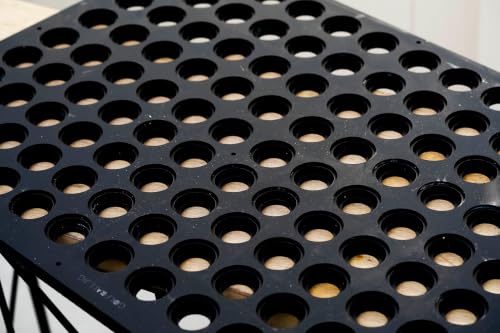
Best for: Small-batch golf ball personalization
The Golf Ball Printing Jig is a 12-space holder made for the Roland BD-8 UV flatbed printer. It positions golf balls during printing, giving each ball a consistent location on the print bed. At $74.99, it offers a lower-cost way to organize repeat jobs without placing every ball by hand. The jig uses plastic designed to stay flat during printer heat and UV curing, though actual results can depend on printer settings and the balls themselves.
Its main advantage is repeatable setup. Load up to 12 golf balls, place the included PDF alignment template, and prepare the artwork around those fixed positions. That can reduce setup work for names, logos, event favors, and other small custom orders. The jig is also useful when several balls need the same design in one run. Buyers needing a different layout can contact the seller about custom slot counts or configurations. The listing does not specify custom pricing, lead time, or compatibility with printers beyond the Roland BD-8, so confirm those details before ordering.
Pros
- Holds 12 golf balls in fixed positions for repeatable printing.
- Includes a PDF template for artwork alignment.
- Plastic construction is designed to resist heat-related warping during UV printing.
Cons
- Twelve spaces may feel limiting for larger production runs.
- Compatibility is presented for the Roland BD-8, so other printers require confirmation before purchase.
3. Golf Ball Printing Jig for A3 Flatbed Printer

Best for: High-volume custom golf ball printing
This golf ball printing jig holds up to 48 balls for an A3 UV flatbed printer. Its multi-slot layout can reduce repeated loading and alignment work when producing personalized balls in larger batches. The jig uses a plastic substrate designed to stay flat under printer heat and UV curing. That material choice targets a common printing problem: movement during the print cycle can spoil placement.
The included PDF template is the main convenience feature. It gives you an artwork guide for the 48 positions, so you can arrange logos or names before sending the file to the printer. At $107.38, the jig may make sense for golf shops, event suppliers, and custom gift businesses that print regularly. Buyers should still confirm their printer’s tray area and ball-printing setup before ordering. Custom slot counts or layouts are available by request, but the listing does not state the price or turnaround for those configurations.
Pros
- Holds 48 golf balls in one A3-sized print setup, reducing repeated loading.
- Plastic construction is designed to resist warping from heat and UV curing.
- Included PDF template helps position artwork across all 48 spaces.
Cons
- It is intended for A3 UV flatbed printers, so it may not fit smaller or different printer formats.
- The fixed 48-slot layout may be more than needed for occasional or small custom orders.
2. A4 XP600 UV DTG Printer

Best for: Small-batch custom merchandise makers
The A4 XP600 UV DTG Printer is a compact flatbed machine for printing phone cases, acrylic, metal, leather, golf balls, bottles, and other small items. Its 22 × 33 cm vacuum platform holds flat materials in place, while the 15 cm maximum object height allows room for thicker pieces. The listed price is $1,959.99, before buying UV ink separately.
An XP600 printhead produces CMYKW+V six-color output at up to 5760 × 1440 dpi. The printer also supports AB-DTF film and bronzing paper. A rotary bottle holder handles curved items such as tumblers, bottles, pens, and golf balls, though each object must fit the attachment and height limits. White-ink circulation helps reduce sediment, and automatic cleaning may lower clogging risk. The package includes AcroRIP White 10.3 software, a USB drive, power cord, manual, and rotary holder. It works with Windows 7 through 11.
Pros
- The 22 × 33 cm vacuum bed helps keep flat substrates aligned during printing.
- Six-color UV output supports detailed designs with white and varnish channels.
- The included rotary holder expands printing to bottles, pens, and golf balls.
Cons
- UV ink is not included, so operating costs begin above the $1,959.99 purchase price.
- The small A4 work area limits production size and suits short runs better than large-format orders.
1. H5 Smart Golf Ball Printer

Best for: Golf shops offering custom balls
The Smart Golf Ball Printer is a dedicated digital UV inkjet machine for printing custom graphics on golf balls. It costs $4,999, so it targets shops, event businesses, and serious personalization services rather than casual home projects. The system can print up to 12 golf balls in one batch, and each ball can carry its own design. No computer or Photoshop is required.
Setup centers on a mobile phone. Scan the machine’s QR code, open the H5 mobile app, select or build artwork, and send it to the printer. The app includes a library of graphics and receives daily image updates, which may help repeat customers find fresh designs. A two-year warranty covers the machine, while lifetime customer service continues after that period. Consumable parts are excluded from warranty coverage.
Pros
- Prints up to 12 golf balls in one batch, which suits orders for tournaments, weddings, and company events.
- Mobile setup avoids a computer and Photoshop, reducing the equipment needed for everyday operation.
- Two-year machine warranty and lifetime customer service provide longer support than the initial coverage period.
Cons
- The $4,999 purchase price is high for occasional users or small personal projects.
- It is designed only for golf balls, so buyers cannot use it for clubs, apparel, signs, or other promotional items.
Buying Guide
The most important factor is compatibility with your golf balls. A printer must handle the 1.68-inch ball diameter, curved dimples, and cover material without smearing or poor registration.
- Ball fixture: Choose a rotary holder made for standard 1.68-inch balls. Confirm that it supports both urethane and Surlyn covers, then request a printed sample.
- Print resolution: Look for at least 600 × 600 dpi for small names, logos, and numbers. A printer with adjustable print height can keep text sharper across curved surfaces.
- Production speed: Check the full cycle time, including loading and UV curing. For small orders, 10 to 30 seconds per ball may be enough, while 100-ball jobs need an automatic feeder.
- Ink and curing: UV ink should cure under a 365 to 405 nm lamp. Ask about replacement lamp life, with 10,000 hours as a useful minimum, and confirm outdoor durability.
- Software and total cost: Select software that imports SVG or PNG files and supports batch layouts. Budget roughly $3,000 to $15,000 for equipment, plus ink, fixtures, and maintenance.
If you cannot have everything, prioritize ball compatibility because accurate printing means little if the ink fails on the cover.
Frequently Asked Questions
What is the best golf ball printer?
The best golf ball printer is a UV printer designed for curved objects, paired with a golf-ball jig and white ink. This setup prints logos, names, and graphics onto coated balls, while the jig keeps each ball steady. Check the supported ball diameter, ink adhesion, and print area before buying; many golf balls measure 1.68 inches across.
How does a golf ball printer work?
A golf ball printer rotates or holds a golf ball while UV ink prints the design onto its surface. The ink usually cures under ultraviolet light during or immediately after printing, so the image dries quickly. A rotary attachment or custom jig matters because a standard flat printer cannot position a spherical ball correctly.
Can a golf ball printer print full-color designs?
Yes, a suitable golf ball printer can print full-color logos, photos, and text when it uses a CMYK ink set and software built for object printing. Some models also add white ink for dark or colored surfaces, but coverage varies by machine and ball finish. Ask for sample output and confirm the supported image file types before ordering.
Are golf ball printers worth buying?
Golf ball printers are worth buying for businesses that produce personalized balls regularly, but they may not make sense for occasional orders. A printer can reduce outsourcing costs when demand is steady, while ink and setup costs add up for small batches. Compare the purchase price with quotes for 12, 50, and 100 printed balls before deciding.
Conclusion
The H5 Smart Golf Ball Printer is the best fit for golfers, coaches, and small businesses that want personalized balls without buying a large commercial setup.
If your priority is higher daily output, pick a commercial-grade golf ball printer instead, since its larger feed capacity and faster workflow can better support tournaments, pro shops, or regular orders. Before buying, double-check the printer’s physical size, supported golf-ball materials and finishes, compatible ink or transfer supplies, included accessories, expected print quantity, warranty terms, and current price. Also confirm that your workspace has enough room for loading and curing printed balls. A lower sticker price may not stay lower after replacement supplies, shipping, and setup costs are included. Check return policy too, especially if the printer uses proprietary cartridges or requires software that may not work with your computer.