
5 Best Ultrawide Monitor Stand for Heavy Monitors
ErGear Heavy Duty Monitor Arm, Full Motion Desk Mount is the top pick for most buyers seeking the best ultrawide monitor stand. Its main advantage is flexible positioning, letting you move a large screen forward, backward, or side to side instead of leaving it fixed on the desk. The arm also frees valuable workspace beneath the monitor.
This guide is for anyone setting up an ultrawide display for work, gaming, or both. Focus first on screen size and weight capacity, then check the mount type, adjustment range, and desk thickness requirements. An arm that cannot safely support your monitor will not solve much. The five picks below are ranked with clear reasons and honest drawbacks for each, so you can match the mount to your desk, display, and budget.
Quick Comparison
| # | Product | Best For | Price | |
|---|---|---|---|---|
| 1 | ErGear Heavy Duty Monitor Arm, Full Motion Desk Mount | Best for heavy monitors | $35.99 | View → |
| 2 | HUANUO Freestanding Monitor Stand | Best for rental desks | $22.99 | View → |
| 3 | WALI Ultrawide Single Monitor Arm | Best for ultrawide displays | $31.34 | View → |
| 4 | VIVO STAND-V001H Single Monitor Desk Stand | Best for stable desk setups | $29.99 | View → |
| 5 | VIVO STAND-V001 Monitor Arm Desk Mount | Best for adjustable monitor positioning | $34.99 | View → |
5 best ultrawide monitor stand: Top Picks
These five stands are ranked from fifth to first, counting down to the top pick for different ultrawide monitor setups.
5. VIVO STAND-V001 Monitor Arm Desk Mount

Best for: Single-monitor home office setups
At $34.99, the VIVO STAND-V001 is a single-monitor desk arm for screens from 13 to 32 inches, plus ultrawide models up to 38 inches. It supports up to 22 pounds when the display uses a 75 x 75mm or 100 x 100mm VESA pattern. Check that mounting pattern and your monitor’s weight before buying.
The arm gives a wide range of positioning. You can tilt the screen 90 degrees up or down, swivel it 360 degrees, and rotate it 360 degrees for portrait or landscape viewing. Height adjustment runs along the center pole for up to 16 inches of movement. A hand-tightened C-clamp fits desks up to 3.25 inches thick, while the included grommet base offers a second mounting method. Detachable clips route power and video cables along the pole and arm. The removable VESA plate simplifies monitor attachment, and included hardware supports assembly. The main appeal is flexibility at a low price, but compatibility checks matter.
Pros
- Supports one monitor weighing up to 22 pounds.
- Offers tilt, swivel, rotation, and 16 inches of height adjustment.
- Includes both C-clamp and grommet mounting options.
Cons
- It cannot support a second monitor.
- It only fits screens with 75 x 75mm or 100 x 100mm VESA holes, and the desk must be no thicker than 3.25 inches.
4. VIVO STAND-V001H Single Monitor Desk Stand
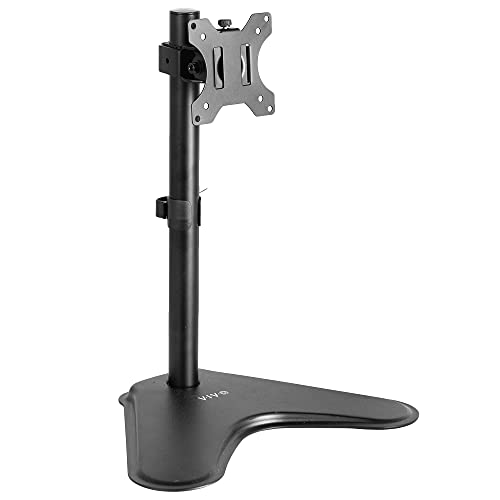
Best for: Single-monitor home office setups
The VIVO STAND-V001H is a freestanding steel monitor stand priced at $29.99. It supports one screen weighing up to 22 pounds, with VESA 75x75mm or 100x100mm mounting holes. The stand fits most monitors from 13 to 32 inches, plus ultrawide models up to 38 inches. Its weighted base sits on the desk, so it does not require drilling or a clamp.
The adjustable center pole lets you raise or lower the display for a more comfortable viewing position during long work sessions. The bracket tilts 15 degrees up or down, swivels 90 degrees, and rotates 360 degrees for portrait or landscape use. An open-top VESA plate makes monitor attachment easier, while built-in cable management helps keep cords in place as you change orientation. Assembly hardware and instructions are included, but the freestanding design still takes up part of your usable desk surface.
Pros
- Supports monitors up to 22 pounds, including screens up to 32 inches and ultrawides up to 38 inches.
- Offers height adjustment, 15-degree tilt, 90-degree swivel, and 360-degree rotation.
- Freestanding steel base avoids desk clamping, with cable management built into the stand.
Cons
- The base occupies desk space that a clamp-mounted arm would leave available.
- Compatibility depends on a 75x75mm or 100x100mm VESA pattern and a 22-pound weight limit.
3. WALI Ultrawide Single Monitor Arm

Best for: Large curved monitors and tidy desks
The WALI Ultrawide Single Monitor Arm supports flat or 1800R curved screens from 17 to 49 inches. It holds up to 33 pounds and fits common 75x75mm or 100x100mm VESA patterns. The arm can extend 21.14 inches from the desk and lift the display up to 20.79 inches, giving large screens more positioning freedom than a fixed stand.
Its adjustment range is broad: 360-degree rotation, plus or minus 90-degree swivel, and plus or minus 75-degree tilt. Cable guides run along the arm, while the raised screen leaves room for a keyboard, notebook, or docking station. Buyers can use either the C-clamp or grommet base on desks measuring 0.39 to 1.96 inches thick. At $31.34, it offers useful movement for a low price. The maker also states that its durable core went through more than 20,000 adjustment cycles.
Pros
- Supports monitors up to 49 inches and 33 pounds.
- Provides strong positioning control with height, tilt, swivel, and rotation adjustments.
- Includes two mounting options and built-in cable routing.
Cons
- The 75x75mm and 100x100mm VESA limit may exclude some larger displays.
- Installation is recommended only for wooden desks, and underside crossbars can block the mount.
2. HUANUO Freestanding Monitor Stand

Best for: Single-monitor desks without drilling
This HUANUO freestanding VESA stand raises one 13- to 34-inch monitor above the desk. Its 17.24-inch steel column supports displays up to 44 pounds, provided the screen uses a 75 x 75 mm or 100 x 100 mm VESA pattern. A tempered-glass base and bottom anti-slip pads help keep the stand planted while protecting the desk surface. At $22.99, it offers a lower-cost alternative to clamp and wall mounts, but buyers still need to confirm their monitor’s measurements and mounting points.
Five height settings place the screen between 9.27 and 15.26 inches tall. The arm tilts from 10 degrees upward to 15 degrees downward, swivels 50 degrees in either direction, and rotates 360 degrees for landscape or portrait viewing. Two cable clips guide wires along the rear of the column. No drilling is required, so setup works for desks where clamps or holes are not practical. The stand handles one monitor only, and an off-center VESA mount may make portrait rotation uneven or less useful.
Pros
- Supports larger displays, from 13 to 34 inches and up to 44 pounds.
- Five height choices provide more positioning control than a fixed riser.
- Tilt, swivel, and 360-degree rotation support shared viewing and portrait mode.
Cons
- It fits only monitors with 75 x 75 mm or 100 x 100 mm VESA holes.
- The freestanding base uses desk space and lacks the extra clearance of a clamp mount.
1. ErGear Heavy Duty Monitor Arm, Full Motion Desk Mount

Best for: Heavy ultrawide home office setups
This ErGear monitor arm supports one 13- to 49-inch screen weighing up to 37.4 pounds. It fits VESA 75 x 75 mm and 100 x 100 mm patterns, so it can handle many standard monitors, including curved and ultrawide models. The thick steel arm uses either a dual C-clamp for desks from 0.39 to 3.15 inches thick or a grommet mount for surfaces up to 2 inches thick.
Its strongest feature is the wide adjustment range. The arm extends 21.2 inches, raises the display as much as 22.2 inches, tilts from +70 to -50 degrees, swivels 90 degrees in either direction, and rotates 360 degrees. That gives you plenty of control for work, gaming, or portrait viewing. The pre-assembled design should also reduce setup time. ErGear lists a 10-year durability target, though long-term performance depends on the monitor weight, desk, and installation quality. At $35.99, it offers a lower-cost alternative to replacing a monitor stand.
Pros
- Supports large screens up to 49 inches and 37.4 pounds.
- Dual C-clamp and grommet options fit several desk types.
- Wide movement range helps position the screen at eye level.
Cons
- It holds only one monitor, so dual-screen users need another arm.
- Compatibility depends on a matching VESA pattern and suitable desk thickness.
Buying Guide
The most important factor is load capacity, because ultrawide monitors can weigh 15 to 35 pounds before adding a stand or accessories. Choose a stand rated at least 5 pounds above your monitor’s total weight, not just its screen size.
- Weight capacity: Match the stand to the monitor and accessories, then add a 5-pound safety margin. A 30-pound monitor needs a mount rated for at least 35 pounds.
- VESA compatibility: Check the monitor’s mounting pattern, commonly 75 x 75 mm or 100 x 100 mm. Confirm the stand includes the correct screws and plate.
- Screen size range: Select a model rated for your panel’s diagonal size. A 34-inch ultrawide often needs a stand rated for 32 to 49 inches, while a 49-inch display needs an extra-large arm.
- Desk attachment: Choose a clamp that fits your desk thickness, usually 0.4 to 3.3 inches. Grommet mounts work better when the desk edge has limited clearance.
- Movement and stability: Look for height adjustment of at least 10 inches, plus tilt from about -15 to +15 degrees. For heavy screens, a wide base or reinforced clamp reduces wobble.
If you can prioritize only one factor, choose a stand with enough weight capacity and verified VESA support.
Frequently Asked Questions
What is the best ultrawide monitor stand for heavy screens?
The best ultrawide monitor stand is a VESA-compatible, height-adjustable model rated above your monitor’s total weight. Look for a 75 x 75 mm or 100 x 100 mm mounting pattern, a wide base, and tilt adjustment. For a 34-inch display, confirm the stand supports its listed weight before buying.
How do I choose the best ultrawide monitor stand?
Choose an ultrawide monitor stand by matching its weight rating, VESA pattern, screen size, and desk space to your setup. A stand rated for 20 pounds should not support a 25-pound monitor. Check the base dimensions too, since some models occupy more than 12 inches of desk depth.
Can a monitor stand hold a 49-inch ultrawide?
A monitor stand can hold a 49-inch ultrawide only when its weight rating, VESA mount, and size limit support that specific display. Many 49-inch monitors weigh over 25 pounds without the original stand. A heavy-duty arm or reinforced base may provide better stability than a lightweight desktop stand.
Are monitor arms better than stands for ultrawide monitors?
Monitor arms are usually better than desktop stands when you need desk space, flexible positioning, or two-screen setups. A suitable arm can move the display several inches forward, backward, or upward. Check its stated capacity carefully, since some arms support only 17 to 34-inch monitors.
Conclusion
The ErGear Heavy Duty Monitor Arm, Full Motion Desk Mount is the top pick for ultrawide monitor owners who need strong support, broad movement, and a desk mount for a large, heavy display. If your priority is the lowest price and fastest setup, choose a fixed monitor stand instead, since it usually has fewer adjustment points and does not require clamp installation. Before buying, double-check your monitor’s screen size and weight, VESA compatibility, the number of monitors supported, desk thickness, clamp clearance, and current price, since discounts and product listings can change quickly, then confirm the mount fits your exact ultrawide model.