
5 Best Laminating Machine for Foiling for Crafts
The 9-Inch Hot & Cold Laminator is the best laminating machine for foiling for most buyers because its two operating modes make it useful beyond foil projects. It handles everyday document and craft work too, so you are not buying a single-purpose tool. The 9-inch format also fits common home workspaces without taking over a desk.
This guide is for crafters, home office users, and small businesses choosing a machine for foil transfers and routine laminating. Focus on maximum pouch width and whether the heat settings suit your foil and carrier materials. A smaller unit can limit project size, while poor material matching can waste sheets and foil. We also consider pouch capacity, control layout, warm-up time, and bench space. These details matter most for regular foil work at home. The five picks below are ranked, with reasons and honest drawbacks for each.
Quick Comparison
| # | Product | Best For | Price | |
|---|---|---|---|---|
| 1 | 9-Inch Hot & Cold Laminator | Home Craft Project Makers | $19.98 | View → |
| 2 | Portable 9-Inch Laminator Machine | Mobile Classroom Users | $23.99 | View → |
| 3 | Bonsaii 9-Inch Laminator Machine | Small Office Document Protection | $25.49 | View → |
| 4 | MAXDONE 11×17 Laminator Machine | Large Poster Preservation | $29.99 | View → |
| 5 | Chilino 13-Inch 4-Roller Laminator Machine | High-Volume Print Shops | $129.99 | View → |
5 best laminating machine for foiling: Top Picks
This list is ranked from fifth place down to the top pick, based on features, usability, and value.
5. Chilino 13-Inch 4-Roller Laminator Machine
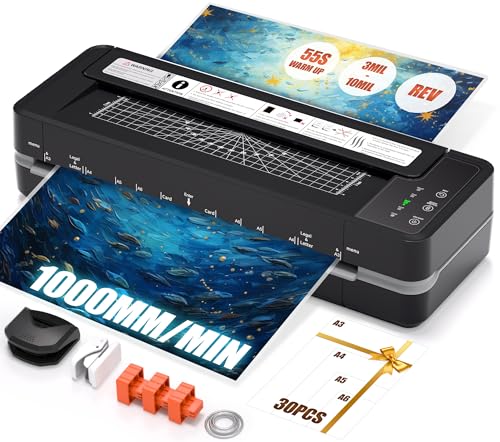
Best for: Schools, offices, and craft studios
The Chilino 13-inch thermal laminator handles documents from small cards through A3 and 11×17 sheets. Its four-roller design uses two heating rollers and two pressing rollers, which should provide more even heat and pressure than basic two-roller machines. It supports 3 to 10 mil pouches, giving buyers options for lightweight photos or thicker menus and signs. The machine reaches operating temperature in about 55 seconds and runs at up to 1,000mm per minute. A 3-mil A4 sheet takes about 17 seconds, according to the listed specifications.
A reverse button helps release a misfed pouch without pulling it through by force. The unit also includes overheating protection and shuts off after 30 minutes without activity. The $129.99 price includes 30 laminating sheets in A3, A4, A5, and A6 sizes. A corner rounder, paper cutter, hole punch, and binder rings add useful finishing tools. This setup suits frequent classroom, office, and project work, but buyers should confirm the included pouch quantities by size before purchase.
Pros
- Four rollers support even heat and pressure across laminated documents.
- A 13-inch feed accepts A3 and 11×17 sheets.
- The reverse function can help remove misfed pouches safely.
Cons
- The 13-inch width cannot handle documents larger than A3 or 11×17.
- The 30-minute auto-shutoff may interrupt work during long pauses.
4. MAXDONE 11×17 Laminator Machine

Best for: Teachers making classroom materials
The MAXDONE laminator handles pouches up to 13 inches wide, including A3, A4, A5, and A6 sizes. It accepts 2.5- to 4-mil pouches, which suit papers, photos, cards, certificates, and menus. At $29.99, it targets home, school, and light office work rather than heavy production use.
It reaches operating temperature in about 90 seconds and moves pouches at up to 13.98 inches per minute. Its temperature control keeps noise below 55 dB, so it should not dominate a classroom or desk area. Thermal mode works with standard laminating pouches, while cold mode handles heat-sensitive inkjet prints with separate self-adhesive sheets. The ABS release button helps clear jams. MAXDONE lists a maximum operating temperature of 293°F and recommends keeping total material thickness at or below 0.5 mm.
Pros
- Supports pouches up to 13 inches wide for larger A3 and 11×17 projects.
- 90-second warm-up and 13.98-inch-per-minute speed reduce waiting time.
- Thermal and cold modes cover standard documents and heat-sensitive prints.
Cons
- Cold lamination requires self-adhesive sheets, which are sold separately.
- Materials thicker than 0.5 mm may not seal tightly at the edges.
3. Bonsaii 9-Inch Laminator Machine

Best for: Home document and photo preservation
The Bonsaii 9-inch thermal laminator is a compact machine for protecting paper, photos, cards, and classroom materials. It accepts pouches from 3 to 5 mil thick and includes 50 laminating sheets, so buyers can start without purchasing supplies. Its 13.07-by-4.41-by-2.44-inch body should fit easily on a desk or shelf. The 9-inch capacity works for standard letter-size projects, but it does not handle larger posters or wide documents.
The machine takes about three minutes to preheat and moves pouches at a listed speed of at least 270 mm per minute. That is suitable for occasional home, office, or classroom jobs. An anti-jam release system is designed to reduce stuck pouches, though no laminator can guarantee perfect results with incorrect loading. Use the 3 mil setting for regular printer paper and lighter items. Thicker materials, such as photo paper and business cards, require the 5 mil setting. A heated-plastic smell may appear during the first few uses. Bonsaii includes two years of professional service.
Pros
- Includes 50 laminating sheets, reducing the need for an immediate supply purchase.
- Compact 13.07-inch length fits small work areas and storage spaces.
- Supports both 3 mil and 5 mil pouches for paper, photos, and cards.
Cons
- The 9-inch maximum width limits larger documents and posters.
- Three-minute preheating is slower than instant-use tools, and first-use odor may bother some users.
2. Portable 9-Inch Laminator Machine

Best for: Teachers protecting classroom worksheets
This 9-inch portable laminator handles A4 documents and smaller items such as photos, menus, labels, and bookmarks. It includes 40 laminating sheets and supports 3 mil and 5 mil pouches. The compact body fits small desks and is light enough to move between rooms. At $23.99, it offers a practical setup for home offices, classrooms, and small businesses.
Hot mode needs about 3.5 minutes to warm up, then feeds material at up to 360 mm per minute. Its mica-sheet heating system and dual rollers aim to spread heat and pressure evenly across each pouch. A single control switches between hot and cold modes. Cold mode starts immediately, but it requires self-adhesive pouches. The ABS release button can help clear jams, while automatic overheat protection shuts the unit down if temperatures rise too far.
Pros
- Includes 40 sheets, so basic projects can start immediately.
- Supports both 3 mil and 5 mil pouches for different document thicknesses.
- Compact 9-inch design saves desk space and stores easily.
Cons
- The 3.5-minute hot-mode warm-up adds waiting time for small jobs.
- Cold lamination requires separate self-adhesive pouches, not standard thermal sheets.
1. 9-Inch Hot & Cold Laminator

Best for: Home paperwork and classroom projects
This $19.98 kit combines a 9-inch laminator, paper trimmer, and 20 pouches. The included pouches cover A4, A5, and A6 sizes, with two A4, three A5, and 15 A6 sheets. It works with standard 80–100 micron thermal pouches, making it suitable for photos, menus, certificates, labels, and school materials. The trimmer can also cut finished pouches to size.
The machine heats in about 90 seconds and runs at 320 mm per minute. Its hot and cold modes add flexibility, although cold mode requires separate self-adhesive pouches. A dual-roller design applies heat and pressure evenly, while NTC temperature control helps limit overheating. The ABS release button gives users a way to remove jammed paper after switching the machine off. At a listed 30 dB, it should create less noise than many office appliances, but buyers should not expect commercial-volume performance from this compact home model.
Pros
- Includes 20 pouches in three useful paper sizes.
- Heats in 90 seconds for quick home or school jobs.
- ABS release button helps remove jammed documents safely.
Cons
- Cold lamination requires self-adhesive pouches, which are not included.
- The 9-inch width cannot handle documents larger than A4.
Buying Guide
The most important factor is adjustable heat control. Toner-reactive foil needs enough heat to bond, but excessive heat can warp paper, damage toner, or leave uneven coverage.
- Temperature range: Choose a machine with adjustable settings from about 250°F to 320°F. A fixed-temperature model gives you less control over different papers and toner types.
- Roller width: A 9-inch opening handles letter-size sheets, while a 12- to 13-inch opening works better for 11-by-17-inch projects. Confirm the listed maximum sheet width.
- Heating and pressure: Look for two heated rollers and a straight feed path. Adjustable speed or pressure can improve foil coverage on thick cardstock and detailed designs.
- Warm-up and duty cycle: A warm-up time under three minutes saves time for small projects. For frequent use, choose a model rated for at least 30 minutes of continuous operation.
- Paper and supply costs: Budget about $40 to $100 for a basic foiling laminator. Check that it accepts 3- to 5-mil pouches, carrier sheets, and foil packs of 20 to 50 sheets.
If you cannot have everything, prioritize adjustable temperature control because poor heat settings cause most foiling failures.
Frequently Asked Questions
How do I choose the best laminating machine for foiling?
The best laminating machine for foiling is a hot-roll laminator with adjustable heat, steady roller pressure, and compatibility with toner-reactive foil. Look for A4 or A3 support, a carrier sheet, and a temperature range near 100–160°C, depending on the toner, foil, and paper weight.
What temperature is best for toner foiling with a laminator?
Foiling usually works at the laminator’s hot setting, often around 100–160°C, but the correct temperature depends on the toner, foil, and cardstock. Start near the manufacturer’s recommended setting, then adjust in small steps. For example, a 120–140°C range often suits standard toner foil, but results vary by machine.
Can any laminator work for foiling?
No, only a hot laminator with suitable heat, pressure, and a smooth paper path can foil reliably. A basic pouch laminator may work with toner foil if the sheet passes through a carrier and the rollers reach the required temperature. Cold laminators will not activate toner-reactive foil.
Are A4 laminators good for foiling?
Yes, an A4 hot laminator is good for small foiling projects, provided it uses toner-activated foil and accepts your paper size. A4 models suit cards, labels, and half-letter sheets, while A3 machines handle larger covers and scrapbook pages. Check the feed width, usually about 230–330 mm.
Conclusion
The 9-Inch Hot & Cold Laminator is the best fit for crafters who want a practical machine for foil projects, school work, and occasional laminating without buying a larger office model. If your priority is higher volume or wider documents, choose a model with a larger feed width and faster processing, since fewer passes can save time. Before buying, double-check the maximum sheet size, compatibility with your foil and carrier sheets, the quantity included in the package, and the current price. For small batches, a compact laminator can keep costs and storage needs low. Match the machine to your materials and project size, then confirm the latest listing details before placing your order.